Core Web Vitals are a specific set of metrics that Google uses to measure real-world user experience on a webpage, with a focus on factors like how quickly it loads, how fast it responds to interaction, and how visually stable it is during the loading process.
The metrics are a critical component of Google’s broader page and experience signals, and because the search engine has already confirmed that they play a role in rankings, Core Web Vitals have quickly become a core component of technical SEO.
The aim behind them is simple: to push the web toward pages that actually feel good to use for everyone.
How Core Web Vitals Work
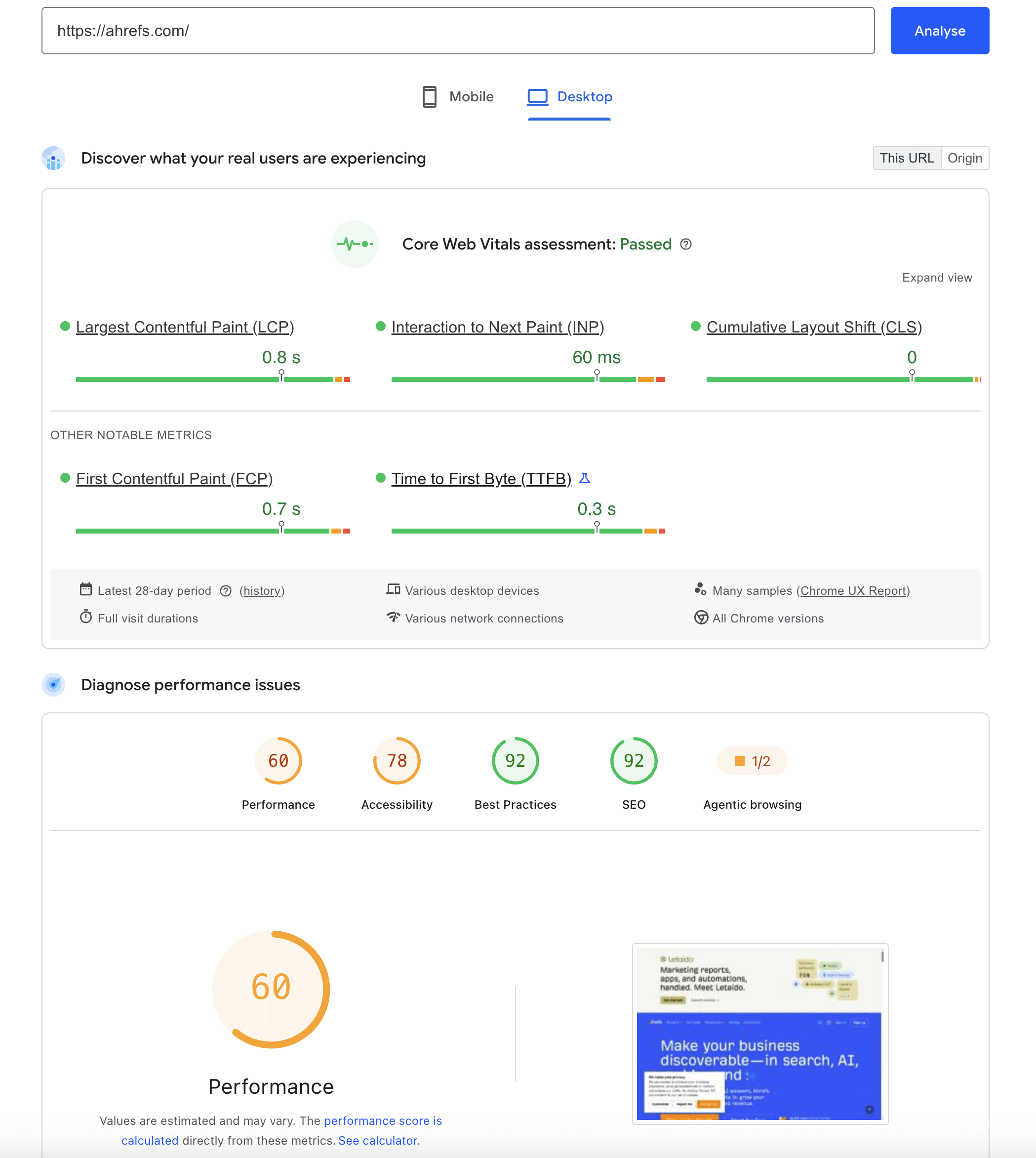
There are free core vitals, each measuring a different pain point for users. The first is Largest Contentful Paint (LCP), which measures loading performance, and specifically how long it takes for the main content of a page to appear. Good LCP tends to last just under 2.5 seconds.
Another measure is Interaction to Next Pain (INP), which recently replaced the older First Input Delay and measures site responsiveness, such as how quickly pages react when users click or interact with content.
Completing the roster of core vitals is Cumulative Layout Shift (CLS), which is a measure of visual stability, capturing how much page elements jump around as it loads. You don’t have to look far when searching for a user who hates clicking the wrong link because the content shifts a centimetre lower at the last second.
There’s a good reason why these specific measures were chosen, and that’s because they offer an accurate illustration of a user’s pain.
Pages that take ages to show content, lags when you attempt to interact, or shuffles around under your finger delivers a negative experience no matter how high quality the content itself actually is.
By creating a measure of these pain points objectively and folding them back into ranking signals, Google offers a timely reminder for site owners to fix these issues that can quietly drive visitors away.
Core Web Vitals also tie into page speed in a more broad sense, which has long mattered for both rankings and conversions.
Using Web Vitals
It’s important to keep your Core Web Vitals considerations in proportion, and don’t spend too much time combing through every aspect of your website’s performance catering to these specific measures.
Yes, web vitals are a ranking factor, but they’re a relatively lightweight one compared to factors like relevance, content quality, and links.
Google has clarified many times that a page with great content and slightly imperfect LCP will still be regarded as better than a fast page with poor content.
With this in mind, you should maintain an emphasis on quality as a priority. Keeping track of your vitals is always a good idea, but it’s not a fix for weak pages, and obsessing over page efficiency while neglecting content is likely to do more harm than good.
Understanding Core Web Vitals
To get the best results out of your web vitals, use tools like Google’s PageSpeed Insights and the Core Web Vitals report, which is available in Google Search Console. These tools can show how your pages perform on real-user data.
If you find that your web vitals are underperforming, common fixes involve optimising the images on your pages, improving server response times, cleaning up render-blocking scripts, and reserving space for elements so that the layout doesn’t shift.
Although it shouldn’t be too time-consuming to clean up your vitals, the best practice is to get your most important pages into the “good” range in terms of speed while focusing on fixing poor performers. Retaining your focus on content and links, which is where your ranking gains are more likely to come from, should be your primary focus.
 194 customers signed up in the last 30 days




 hello@solvid.co.uk