Free Website Traffic Checker


Estimate any website’s organic traffic in seconds, including your competitors’. Monthly visits, top pages and the keywords driving them. All figures are organic search estimates for your chosen market, so you can size up any site without needing its analytics.

Shows organic search traffic estimates — not analytics data.

How traffic estimation works.

No tool can see another website’s analytics. What traffic checkers can see is ranking data: which keywords a domain ranks for, in which positions, and how many people search for those keywords each month. Combine position with search volume and a click-through model (position one gets a far larger share of clicks than position seven) and you can estimate how many visits Google sends that site every month. That is exactly what this tool does.

The important consequence is that the figures are organic search estimates, not analytics numbers. They cover traffic from Google’s organic results in the market you select. Direct visits, social media, email, referral links and paid campaigns are all invisible to this method. For most competitive research that is fine, because organic search is usually the channel you are actually competing on.

Estimates earn their keep in comparison and trend work. Is a competitor twice your size in organic or ten times? Is their traffic growing or fading? Which of their pages pull the most visits, and from which keywords? Those questions do not need decimal-point precision, they need consistent methodology, and that is what a ranking-based estimate provides. Run the same check on ten competitors and you get a genuinely useful league table of your market, something no amount of guessing could give you.

Here’s the tool on the inside:
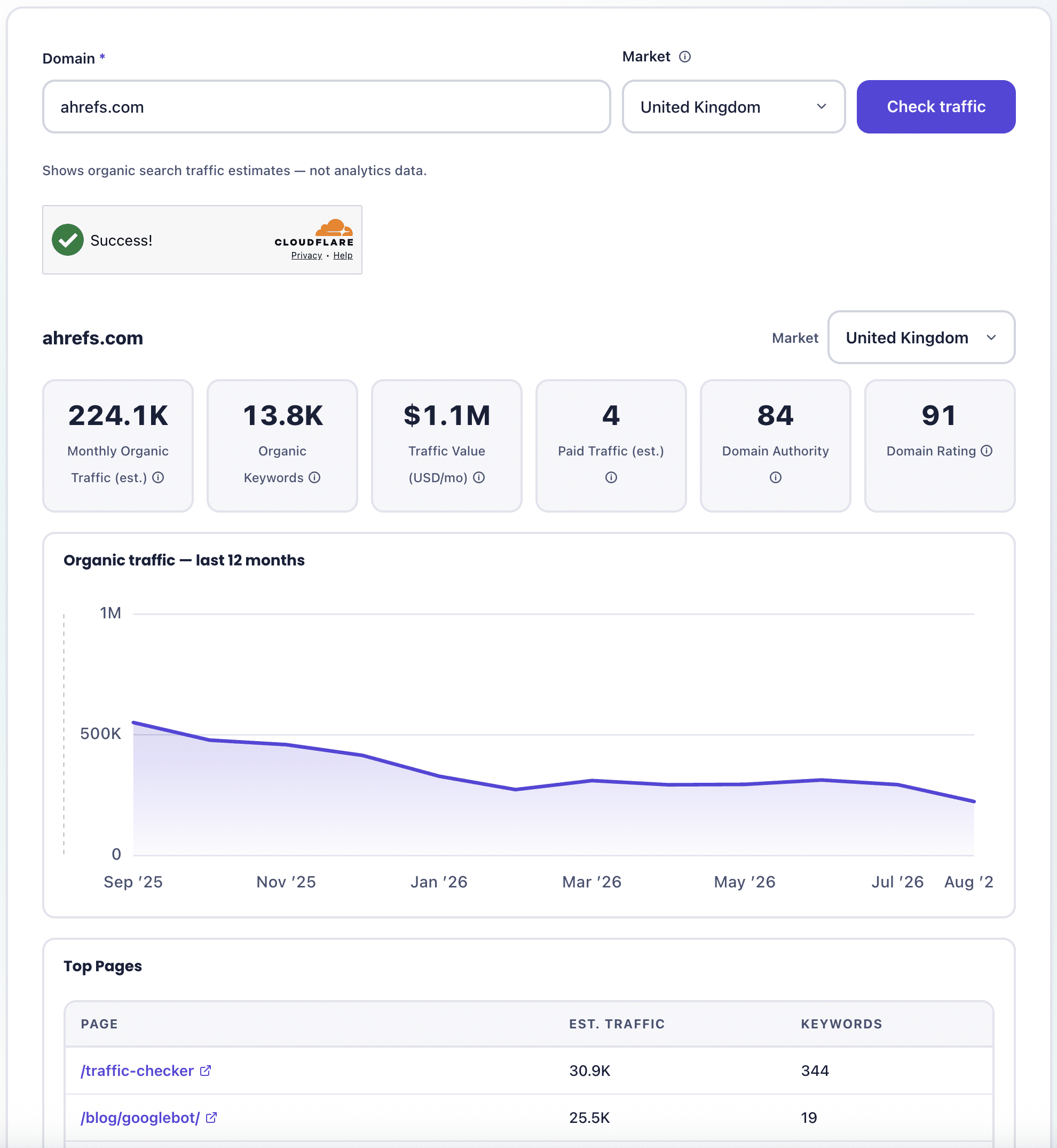
Website Traffic Checker

How to use the traffic checker.

Enter the domain

Type any domain, yours or a competitor’s. The tool normalises the input, so pasting a full URL is fine.

Choose your market

Pick the Google market you care about, such as the United States or the United Kingdom. Ranking data is collected per market, so figures always describe one market at a time rather than a worldwide total.

Run the check

The tool pulls the domain’s current ranking overview, twelve months of history and its strongest pages. Fresh lookups take a few seconds; recently checked domains return instantly from cache.

Read the headline cards and trend

You get four cards: estimated monthly organic traffic, organic keyword count, traffic value in USD per month, and estimated paid traffic. Below them, a 12-month chart shows whether organic traffic is growing, flat or declining.

Who this tool is designed for.

Anyone who needs to check 3rd party’s estimated organic traffic will find this tool useful.

Advertisers

Check a website’s estimated organic traffic before committing to an advertising partnership

SEOs

Benchmark your organic performance against every site you compete with

AI specialists

Check the website’s organic traffic before getting brand mentions from them

Content marketers

See which competitor pages pull the most traffic and reverse-engineer why

Link builders

Vet prospects by real organic traffic, not just authority scores

Publishers

Check website’s traffic before linking or mentioning them in your article

Agencies

Add quick traffic snapshots to pitches, audits and monthly reports

Website buyers

Sanity-check traffic claims before buying a website or a domain name

Why we built it.

Traffic checks are one of the most frequent tasks inside Solvid. Over 11+ years of SEO and link building work, and 30,000+ backlinks built, our team has checked estimated traffic for tens of thousands of domains: competitor benchmarking at the start of every campaign, prospect vetting before every placement, and progress tracking after. Real organic traffic is part of our 10-point quality control process precisely because authority scores alone are so easy to fake.

Most free traffic checkers online are bait. They show one rounded number, blur everything else and push you into a trial. We wanted the version our own team would actually use for a quick check: real estimates, a trend line, top pages, traffic value, and a clear statement of what the numbers do and do not mean.

If the check shows a competitor pulling ahead, or your own trend heading the wrong way, closing that gap is what our SEO service and link building service are built for.

A note on reading estimates: Treat every figure as a comparison tool, not a measurement. If the tool says a site gets 40,000 monthly organic visits, the honest reading is “tens of thousands, and here is the trend”. That is exactly the level of precision competitive decisions need.

How it works under the hood.

The tool is powered by leading SEO data providers that maintain databases of billions of keywords and the pages ranking for them, per Google market. When you run a check, our server requests three things: the domain’s current ranking overview (estimated organic traffic, keyword count, traffic value and paid traffic), twelve months of historical traffic estimates for the trend chart, and the domain’s top pages ordered by estimated traffic.

Estimated traffic is calculated by the provider from each ranking keyword’s search volume, the domain’s position and a click-through-rate curve, summed across every keyword the domain ranks for in the selected market. Traffic value applies current Google Ads cost-per-click rates to those estimated clicks, which is why a site ranking for commercial keywords shows a much higher value than a site with the same traffic from informational terms.

To be explicit about the limits: these are modelled estimates of organic search traffic, not analytics data, and they will differ from the site’s own numbers. There is no true worldwide figure, because ranking data is per market. Results are cached for 24 hours per domain and market combination, so repeat checks on popular domains return instantly without extra cost. A disclaimer to that effect sits under every report, because we would rather you trust the tool for the right reasons than for the wrong ones.

Please Note:

1. This tool is provided free of charge and as-is. All figures are estimates of organic search traffic modelled from third-party ranking data; they are not analytics numbers and will differ from a site’s real figures.

2. Estimates cover the selected Google market only and exclude direct, social, email, referral and most paid traffic.

3. Traffic value figures are hypothetical Google Ads equivalents in USD, not revenue and not a Google metric.

4. Fair-use rate limits apply and results are cached for up to 24 hours. No estimate shown here is a guarantee of any SEO outcome.

FAQ.

Common questions about traffic estimates, what they include and how to read them properly.

How accurate are the traffic estimates?
Accurate enough to compare sites and spot trends, not accurate enough to audit anyone’s analytics. Estimates are modelled from ranking positions and search volumes, so expect them to sit within a sensible range of the real figure rather than match it.
Why do figures differ from Analytics?
Analytics measures real visits on the site itself; this tool models visits from ranking data. Different methods will always produce different numbers. Use analytics for your own site and estimates for sites you cannot access.
Can I check different countries?
Yes. Pick a market from the selector and the whole report recalculates for that Google market. Figures are always per market rather than worldwide, because ranking data is collected market by market.
How often is the data updated?
The underlying ranking database is refreshed continuously by the data provider, and we cache each domain and market combination for 24 hours. The trend chart shows the last 12 months so you can see the direction of travel.
Is this a site's total traffic?
No. The tool estimates organic search traffic from Google only. Direct visits, social, email, referral and paid traffic are not included, apart from a separate paid search estimate shown as its own card.
What does traffic value mean?
Traffic value is what the site’s estimated organic clicks would cost if bought through Google Ads at current cost-per-click rates, shown in USD per month. It is a useful way to express what the organic visibility is worth commercially.
Why does a site show zero traffic?
It usually means the domain does not rank for tracked keywords in the selected market. Try another market first, especially for non-English sites. Genuinely new or very small sites may show zero everywhere until they start ranking.
Is the website traffic checker free?
Yes. No account, no email address, no card details. We apply fair-use rate limits because each fresh lookup queries paid data sources, but normal use will not hit them.